
30 Days Of LeetCode Database Challenge Day 6 - 262. Trips and Users(Difficulty Hard)
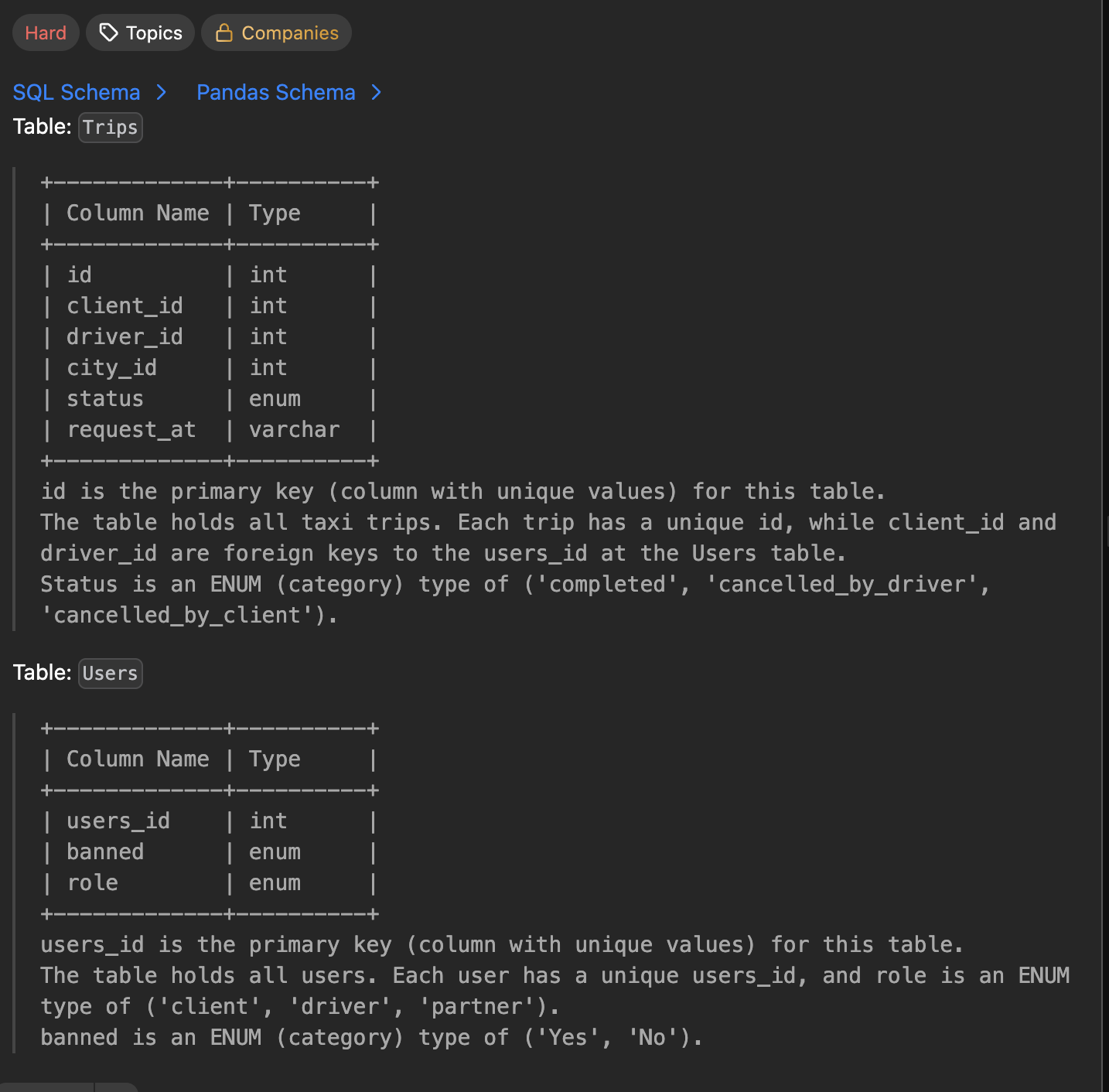

အားလုံးပဲ မင်္ဂလာပါ။ ဒီနေ့ Day 6 အတွက်ကတော့ Leetcode ရဲ့ difficulties Hard level problem တစ်ပုဒ်ဖြစ်တဲ့ *262. Trips and Users *ဆိုတဲ့ problem ကို ရွေးချယ်ထားပါတယ်။ ဒီပုစ္ဆာ အတွက်ကတော့ Trips နဲ့ Users ဆိုတဲ့ table နှစ်ခုပေးထားပါတယ်။
Trips table မှာတော့ client id နဲ့ driver id ကို foreign key အနေနဲ့ထည့်သွင်းထားပါတယ်။ status ကတော့ enum value ('completed', 'cancelled_by_driver', 'cancelled_by_client') ဖြစ်ပါတယ်။ Users table ထဲမှာလည်း user id က primary key ဖြစ်ပြီး role ကိုတော့ enum value (client', 'driver', 'partner'), နဲ့ banned ကိုလည်း enum value ('Yes', 'No') အနေနဲ့ သတ်မှတ်ထားပါတယ်။
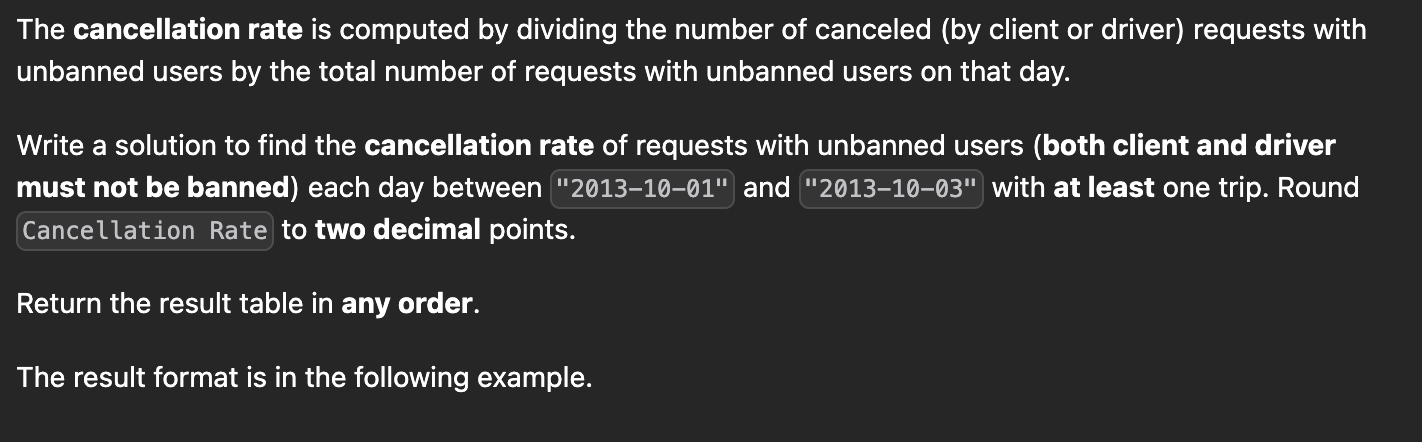
ဒီပုစ္ဆာလေးအတွက်ကတော့ banned မခံထားရတဲ့ client or driver က တစ်နေ့တာ cancelled လိုက်တဲ့ cancellation rate ကို '2013-10-01' ကနေ '2013-10-03' ရက်နေ့အတွင်းရှာပေးရမှာပဲဖြစ်ပါတယ်။ Order ကတော့ကြိုက်တဲ့ order ဖြစ်လို့ရပါတယ်။ Cancellation rate တွက်ဖို့ကတော့ သူပေးထားတဲ့အတိုင်း banned မခံထားရတဲ့ client or driver က cancel လုပ်လိုက်တဲ့ အရေအတွက်ကို banned မခံထားရတဲ့ client or driver က သွားခဲ့တဲ့ trips records နဲ့စားပေးရမှာပဲဖြစ်ပါတယ်။ Cancellation rate ကိုလည်း decimal 2နေရာစာပဲ round လုပ်ပေးရမှာဖြစ်ပါတယ်။
Formula
Cancellation Rate = Canclled Record(Not Banned Client Or Driver) / Total Trips Record (Not Banned Client Or Driver)
1Trips table:
2+----+-----------+-----------+---------+---------------------+------------+
3| id | client_id | driver_id | city_id | status              | request_at |
4+----+-----------+-----------+---------+---------------------+------------+
5| 1  | 1         | 10        | 1       | completed           | 2013-10-01 |
6| 2  | 2         | 11        | 1       | cancelled_by_driver | 2013-10-01 |
7| 3  | 3         | 12        | 6       | completed           | 2013-10-01 |
8| 4  | 4         | 13        | 6       | cancelled_by_client | 2013-10-01 |
9| 5  | 1         | 10        | 1       | completed           | 2013-10-02 |
10| 6  | 2         | 11        | 6       | completed           | 2013-10-02 |
11| 7  | 3         | 12        | 6       | completed           | 2013-10-02 |
12| 8  | 2         | 12        | 12      | completed           | 2013-10-03 |
13| 9  | 3         | 10        | 12      | completed           | 2013-10-03 |
14| 10 | 4         | 13        | 12      | cancelled_by_driver | 2013-10-03 |
15+----+-----------+-----------+---------+---------------------+------------+
16
17Users table:
18+----------+--------+--------+
19| users_id | banned | role   |
20+----------+--------+--------+
21| 1        | No     | client |
22| 2        | Yes    | client |
23| 3        | No     | client |
24| 4        | No     | client |
25| 10       | No     | driver |
26| 11       | No     | driver |
27| 12       | No     | driver |
28| 13       | No     | driver |
29+----------+--------+--------+
30
31Output:
32+------------+-------------------+
33| Day        | Cancellation Rate |
34+------------+-------------------+
35| 2013-10-01 | 0.33              |
36| 2013-10-02 | 0.00              |
37| 2013-10-03 | 0.50              |
38+------------+-------------------+
Explanation
- On 2013-10-01:
- There were 4 requests in total, 2 of which were canceled.
- However, the request with Id=2 was made by a banned client (User_Id=2), so it is ignored in the calculation.
- Hence there are 3 unbanned requests in total, 1 of which was canceled.
- The Cancellation Rate is (1 / 3) = 0.33
- On 2013-10-02:
- There were 3 requests in total, 0 of which were canceled.
- The request with Id=6 was made by a banned client, so it is ignored.
- Hence there are 2 unbanned requests in total, 0 of which were canceled.
- The Cancellation Rate is (0 / 2) = 0.00
- On 2013-10-03:
- There were 3 requests in total, 1 of which was canceled.
- The request with Id=8 was made by a banned client, so it is ignored.
- Hence there are 2 unbanned request in total, 1 of which were canceled.
- The Cancellation Rate is (1 / 2) = 0.50
Example ပေးထားတဲ့ ထဲမှာ ပထမဆုံးအနေနဲ့ ဆယ်လပိုင်း 1 ရက်နေ့မှာ record လေးခုရှိတယ် အဲ့ထဲမှာမှ နှစ်ခုက cancelled ဆိုတော့ cancelled count ကနှစ်ခုဖြစ်မယ်။ သို့သော် Trips id 2 cancelled record မှာ လုပ်ထားတဲ့ client id 2 က banned ခံထားရတဲ့ user ဖြစ်နေတော့ ignore လုပ်လိုက်ရမှာပဲဖြစ်ပါတယ်။ ဒါကြောင့် cancelled count က 1 ဖြစ်ပါတယ်။ banned ခံရတဲ့ user (id 2)ကိုဖယ်လိုက်ရင် တစ်ရက်စာ trip count က 3 ဖြစ်တော့ cancellation rate formula အရ 1/3 ပဲဖြစ်ပါတယ်။ ဒါဆို ကျွန်တော်တို့ SQL လေးရေးကြည့်ရအောင်ဗျာ။
1SELECT t.request_at AS 'Day',
2       ROUND(
3            SUM(CASE WHEN t.status != 'completed' THEN 1 ELSE 0 END) / COUNT(t.id),
4            2
5       ) AS 'Cancellation Rate'
6
7FROM Trips t
8JOIN Users client
9  ON client.users_id = t.client_id
10 AND client.banned = 'No'
11
12JOIN Users driver
13  ON driver.users_id = t.driver_id
14 AND driver.banned = 'No'
15
16WHERE t.request_at BETWEEN '2013-10-01' AND '2013-10-03'
17GROUP BY t.request_at;
18
ဒီမှာဆို ကျွန်တော်တို့က Trips ထဲမှာ client ကော driver ကော သုံးမှာဖြစ်တယ် အဲ့တော့ inner join နဲ့ ပဲနှစ်ခါ join လိုက်တယ် client အတွက်နဲ့ driver အတွက်ပေါ့။ Join တဲ့ condition နောက်မှာ banned ကို 'No' နဲ့ check ထားတော့ banned မခံထားရတဲ့ client or driver တွေပဲပါလာမှာဖြစ်ပါတယ်။ နောက်ဆုံး where မှာကတော့ 1 ရက်နေ့ကနေ 3 ရက်နေ့အတွင်း record တွေကိုလိုချင်တော့ between နဲ့စစ်ထားပြီး တစ်ရက်စာချင်းစီအတွက် တွက်ချင်တာဖြစ်လို့ request date နဲ့ group by လုပ်ထားတာပဲဖြစ်ပါတယ်။
ဒါဆို ကျွန်တော်တို့ Select လုပ်ထားတဲ့ နေရာက Cancellation rate တွက်တဲ့အပိုင်းလေးကိုကြည့်လိုက်ရအောင်။ ပထမဆုံးအနေနဲ့ decimal 2နေရာစာပဲ ယူပေးရမှာဆိုတော့ Round function လေးကိုသုံးပြီး ရှေ့က decimal vale(Cancellation rate) နောက်က 2နေရာစာ 2 ကိုထာ့်ပေးထားပါတယ်။ Cancellation rate ကိုတွက်ဖို့ဆိုပထမဆုံး အချက်က banned မခံထားရတဲ့ client or driver ဖြစ်ဖို့လိုပါတယ်။ ကျွန်တော်တို့က Join ထဲကစစ်ပြီးသားဆိုတော့ ဒီအချက်ကပြေလည်ခဲ့ပါပြီ။ formula အရဆို cancelled လုပ်လိုက်တဲ့ count ဆိုတော့ status complete မဖြစ်တဲ့ဟာတွေကိုဆွဲယူလိုက်ရင်ရပါတယ်။ ဒီနေရာမှာတော့ ကျွန်တော် case လေးကိုသုံးထားပြီး status က complete မဟုတ်ရင် 1 ဟုတ်ရင် 0 အနေနဲ့ တန်ဖိုးပေးပြီး SUM function နဲ့ပြန်ပေါင်းလိုက်တာပဲဖြစ်ပါတယ်။ ဒါဆို cancelled count တော့ရပြီဗျ။ total number of trips ကိုလည်း COUNT function လေးထဲမှာ trips id လေးတွေကိုထည့်ပေးလိုက်ပြီး formula အတိုင်းစားပေးလိုက်ရင် ပုစ္ဆာလေးကတော့ အဆင်ပြေသွားပြီပဲဖြစ်ပါတယ်ဗျာ။ Video လေးကိုတော့ အောက်က YouTube link လေးကနေဝင်ကြည့်လို့ရပါတယ်ဗျာ။ Thank and see you all ပါဗျာ။
30 Days Of LeetCode Database Challenge Day 6 - (262. Trips and Users)
Watch on YouTubeDiscussion
Join the conversation
How do you feel about this article?
Comments
Sign in to join the conversation
Sign in to be the first to comment!
Share Your Article
Share with your professional network
Recent Articles

AWS - Application Load Balancer
Elastic Load Balancing (ELB) ELB ဆိုတာကတော့ request တွေကို တစ်နေရာတည်းမှ လက်ခံကာ Amazon EC2 instances၊ containers, etc.....


Terraform Day 3: Benefits of Terraform State
Terraform ကိုလေ့လာ တဲ့အခါ ကျွန််တော်တို့ရဲ့ Project Folder ထဲမှာ terraform.tfstate ဆိုတဲ့ ဖိုင်လေးကို တွေ့ဖူးကြပါလိမ့်မယ...


Terraform Day 2: Essential IaC Principles You Must Know
မနေ့ကတော့ Terraform အကြောင်း အကြမ်းဖျင်း Concept ကို ပြောပြခဲ့ပြီးပြီဆိုတော့ ဒီနေ့မှာတော့ Terraform ကို Professional ကျက...

TCP/IP Protocol
အားလုံးပဲမင်္ဂလာပါ။ ဒီနေ့ ကျွန်တော်တို့ TCP/IP Protocol အကြောင်း ဆွေးနွေးသွားပါမယ်။ ပထမဆုံးအနေနဲ့ TCP/IP ရဲ့ History လေး...


Terraform Day 1: Introduction to IAC and Terraform
ကျွန်တော်တို့ cloud အကြောင်း စပြောကြပြီဆိုရင် အရင်ဆုံး ခေါင်းထဲရောက်လာတာ Console ထဲဝင်၊ UI ကနေ ခလုတ်လေးတွေ လိုက်နှိပ်ပြီ...