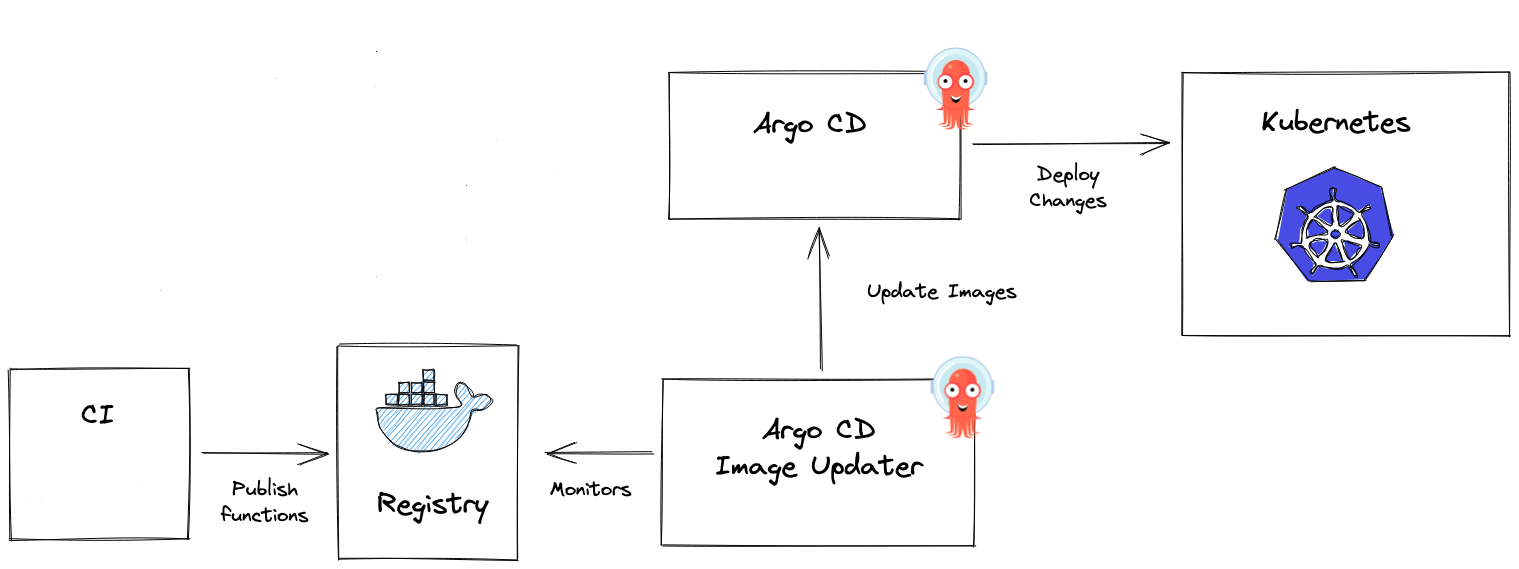
ဒီနေ့တော့ ကျွန်တော် argocd image updater အကြောင်းကို နားလည်သလောက် ရှင်းပြသွားပါမည်။ argocd image updater ဆိုတာ kubernetes မှာအသုံးပြုထားတဲ့ container images တွေကို အလိုအလျောက် update လုပ်ပေးသွားတဲ့ tool ဖြစ်ပါတယ်။ container registry ထဲကို pod တွေမှာသုံးမယ့် image tag အသစ်တစ်ခုရောက်လာတာနဲ့ gitops repository မှာ ရလာတဲ့ image အသစ် နဲ့ update လုပ်ပေးသွားမှာဖြစ်ပါတယ်။
how does it work?
image updater မပေါ်ခင်တုန်းကတော့ cicd pipeline မှာ script တွေရေးကြပြီး image အသစ်ကို update ဖြစ်အောင်လုပ်ခဲ့ကြပါတယ်။ အခုတော့ image updater ကနေ image အသစ်တစ်ခုရလာတိုင်းမှာ deployment တွေဆီကို အလိုအလျောက်ပြောင်းပေးသွားမှာဖြစ်ပါတယ်။
how to install it?
argocd amespace ထဲမှာ image updater ကိုလည်း install ပေးဖို့လိုပါတယ်။
1$ kubectl apply -n argocd -f https://raw.githubusercontent.com/argoproj-labs/argocd-image-updater/stable/manifests/install.yamlပြီးသွားတဲ့အခါမှာတော့ အောက်ကလို image updater pod တစ်ခု run နေတာကိုတွေ့ရပါလိမ့်မည်။
1$ kubectl get pods -n argocd | grep updater
2NAME                                                READY   STATUS    RESTARTS       AGE
3argocd-image-updater-947df9d9b-7khm9                1/1     Running   0              43h
ပြီးသွားရင် log level ကို debug ပြောင်းပေးရပါမည်။
1$ kubectl edit configmaps --namespace argocd argocd-image-updater-configအောက်ပါအတိုင်း log level ကို သတ်မှတ်ပေးလိုက်ပါ။
1apiVersion: v1
2data:
3  log.level: debug
4kind: ConfigMap
နောက်ဆုံးအဆင့်အနေနဲ့ image updater ကို ကျွန်တော်တို့ရဲ့ container registry နဲ့ authenticate လုပ်ပေးရပါမယ်။ အရင်ဆုံး docker-registry secret တစ်ခု create ပေးရပါမည်။ ကျွန်တော်ကတော့ azure acr ကိုသုံးထားပါတယ်။
1$ kubectl -n argocd create secret docker-registry mycontainerregistry-secret --docker-server=mycontainerregistry.azurecr.io --docker-username=mycontainerregistry --docker-password=PASSWORD -o yaml --dry-run=client | kubectl -n argocd apply -f -credentials နေရာမှာ pull secret ကိုသုံးထားပါတယ် အောက်က argocd က namespace ဖြစ်ပြီး အနောက်ကတော့ registry ရဲ့ secret ဖြစ်ပါတယ်။
1apiVersion: v1
2data:
3  log.level: debug
4  registries.conf: |
5    registries:
6    - name: Azure Container Registry
7      prefix: dinger.azurecr.io
8      api_url: https://myreg.azurecr.io
9      credentials: pullsecret:argocd/mycontainerregistry-secret
10kind: ConfigMap
11metadata:
အသေးစိတ်ကို ဒီမှာ ဖတ်နိုင်ပါတယ်။ ဒီနေရာမှာ အရေးကြီးဆုံးတစ်ခုက pod ကို restart လုပ်ပေးရပါမယ်။
1$ kubectl delete pod argocd-image-updater-947df9d9b-7khm9 -n argocdimage ကို update လုပ်ဖို့ latest, digest, name ဆိုပြီး strategy တွေရှိပါတယ်။ ကျွန်တော်က latest ကိုသုံးထားပါတယ်။ created time အရ updated အဖြစ်ဆုံး image ကို kubernetes pod တွေမှာ သုံးပေးသွားမှာဖြစ်ပါတယ်။
အောက်က argocd application လေးကိုကြည့်ရအောင်။ အထူးသဖြင့် annotations တွေပေါ့။ ကျန်တာတွေကတော့ သာမန် application တွေအတိုင်းပါပဲ။
argocd မှာ manifests တွေကို kustomizate, helm စသည်ဖြင့် support လုပ်ပါတယ်။ ကျွန်တော်ကတော့ helm ကိုသုံးပါတယ်။
1apiVersion: argoproj.io/v1alpha1
2kind: Application
3metadata:
4  name: api-testing
5  namespace: argocd
6  annotations:
7    argocd-image-updater.argoproj.io/image-list: myalias=dinger.azurecr.io/api-testing
8    argocd-image-updater.argoproj.io/myalias.update-strategy: latest
9    argocd-image-updater.argoproj.io/write-back-method: git
10    argocd-image-updater.argoproj.io/git-branch: testing
11    argocd-image-updater.argoproj.io/myalias.force-update: "true"
12  finalizers:
13  - resources-finalizer.argocd.argoproj.io
14spec:
15  destination:
16    namespace: testing
17    name: in-cluster
18  project: default
19  syncPolicy:
20    automated:
21      prune: true
22      selfHeal: false
23    syncOptions:
24      - CreateNamespace=true
25      - ApplyOutOfSyncOnly=true
26  source:
27    path: helm-charts/api-testing
28    repoURL: git@github.com:myorg/kubernetes.git
29    targetRevision: HEAD
myorg/kubernetes ဆိုတဲ့ repo မှာ argocd အတွက် helm chart တွေကို ထည့်ထားပါတယ်။ api-testing ဆိုတဲ့ argocd application ထဲမှာ container image အတွက် dinger.azurecr.io/api-testing ကိုအသုံးပြုထားပါတယ်။ image updater က cicd ကနေ docker နဲ့ build လုပ်ပြီး image အသစ် ထွက်လာတိုင်း helm chart မှာ သုံးထားတဲ့ dinger.azurecr.io/api-testing image အတွက် tag အသစ်ကို update လုပ်သွားမှာဖြစ်ပါတယ်။
Discussion
Join the conversation
How do you feel about this article?
Comments
Sign in to join the conversation
Sign in to be the first to comment!
Share Your Article
Share with your professional network
Recent Articles

AWS - Application Load Balancer
Elastic Load Balancing (ELB) ELB ဆိုတာကတော့ request တွေကို တစ်နေရာတည်းမှ လက်ခံကာ Amazon EC2 instances၊ containers, etc.....

Terraform Day 3: Benefits of Terraform State
Terraform ကိုလေ့လာ တဲ့အခါ ကျွန််တော်တို့ရဲ့ Project Folder ထဲမှာ terraform.tfstate ဆိုတဲ့ ဖိုင်လေးကို တွေ့ဖူးကြပါလိမ့်မယ...

Terraform Day 2: Essential IaC Principles You Must Know
မနေ့ကတော့ Terraform အကြောင်း အကြမ်းဖျင်း Concept ကို ပြောပြခဲ့ပြီးပြီဆိုတော့ ဒီနေ့မှာတော့ Terraform ကို Professional ကျက...
TCP/IP Protocol
အားလုံးပဲမင်္ဂလာပါ။ ဒီနေ့ ကျွန်တော်တို့ TCP/IP Protocol အကြောင်း ဆွေးနွေးသွားပါမယ်။ ပထမဆုံးအနေနဲ့ TCP/IP ရဲ့ History လေး...

Terraform Day 1: Introduction to IAC and Terraform
ကျွန်တော်တို့ cloud အကြောင်း စပြောကြပြီဆိုရင် အရင်ဆုံး ခေါင်းထဲရောက်လာတာ Console ထဲဝင်၊ UI ကနေ ခလုတ်လေးတွေ လိုက်နှိပ်ပြီ...