Day 2 - Navigating the Linux File System: Where Am I and Where Can I Go?
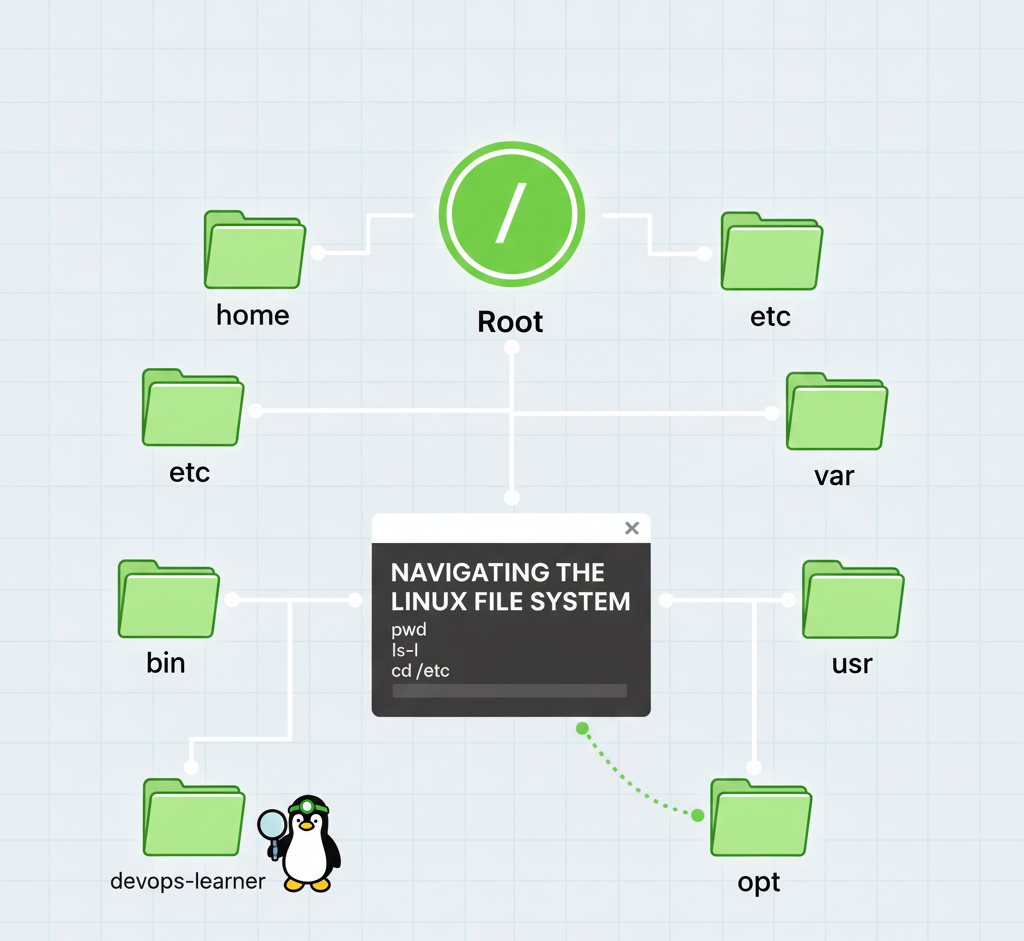

အားလုံးပဲ မင်္ဂလာပါ ။ ပထမ article မှာ Linux ရဲ့ အရေးပါပုံကို လေ့လာခဲ့ပြီးပြီဆိုတော့ ဒီနေ့မှာတော့ Linux ရဲ့ map လို့ ခေါ်လို့ရတဲ့ File System ထဲကို ဆက်ခြေချကြည့်ရအောင်ဗျာ။
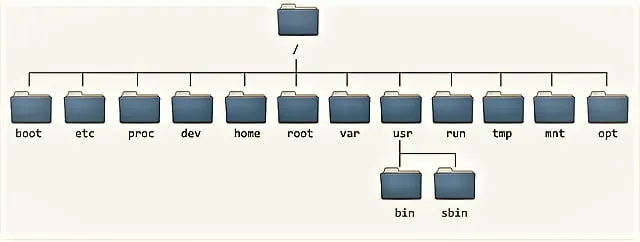
File Hierarchy Standard
Linux Command Line (CLI) နဲ့ စပြီး အလုပ်လုပ်တဲ့အခါ Linux ရဲ့ File System ကြီး ဘယ်လိုအလုပ်လုပ်လဲဆိုတာ သိနားလည်ဖိုက အရေးကြီးဆုံးပါ။ ဒါမှသာ ကျွန်တော်တိုက ဘယ် directory ရောက်နေတယ်၊ လက်ရှိ directory ကနေ ကိုယ်သွားချင်တဲ့ directory ကို ဘယ်လို command သုံးရင် ရောက်နိုင်လဲဆိုတာတွေကို သိနိုင်မှာပါ။ Linux ရဲ့ Directory ဆိုတာက Window တို့ Mac တို့မှာ ရှိတဲ့ Folder နဲ့ အတူတူပါပဲ။
Windows မှာ Drive C: လိုမျိုး ရှိသလို Linux မှာလည်း Root လိုခေါ်တဲ့ main starting point လေး ရှိပါတယ်။ ဒီကောင့်ကို Root Directory ( / ) ဆိုပြီး ခေါ်ပြီး Linux မှာ ရှိတဲ့ Directories တွေ Files တွေ အားလုံးက ဒီကောင်ကနေတစ်ဆင့် ခွဲဖြာပြီး ထွက်သွားတာပါ ။ ဒီ File Hierarchical System ကိုသာ ကောင်းကောင်း နားလည်မယ်ဆိုရင် ဘယ်လို Linux OS ကိုမဆို အဆင်ပြေပြေ သုံးနိုင်မှာပါ။
ဒီနေ့မှာတော့ directory တွေကြား တစ်နေရာကနေ တစ်နေရာ သွားဖို့ basic command (၃)ခုကို လေ့လာမှာပါ။
Command (1): Where Am I? (pwd)
ကျွန်တော်တို Terminal ကို ဖွင့်လိုက်တာနဲ့ လက်ရှိရောက်နေတဲ့နေရာ (Current Working Directory) ကို သိဖို့လိုပါတယ်။
pwd (Print Working Directory)
pwd command က လက်ရှိ ကိုယ်ရှိနေတဲ့ လမ်းကြောင်း (Path) အပြည့်အစုံကို ပြပေးပါတယ်။
1 pwdSample Output:
1/home/devops-learner(ဆိုလိုတာက ကျွန်တော်တိုက /home ထဲက devops-learner လိုအမည်ရှိတဲ့ directory ထဲမှာ ရောက်နေတာပါ)
Command (2): What's Around Me? (ls)
ကိုယ်ရောက်နေတဲ့ Directory ထဲမှာ ဘယ်လို file တွေ၊ sub-directories တွေ ရှိနေလဲဆိုတာကို သိဖို ls ကို သုံးရပါတယ်။
ls (List)
ls command က လက်ရှိ Directory အတွင်းမှာရှိတဲ့ directoriesတွေ files တွေကို list လုပ်ပေးပါတယ်။
1lsတကယ့် DevOps daily work တွေမှာဆို ရိုးရိုး ls ထက် ပိုပြီး details ကြည့်ဖို့ လိုပါတယ်။ အဲ့ခါ ကျွန်တော်တို့က
1ls --helpကို သုံးပြီး ls ရဲ့ တစ်ခြား options တွေကို ဆက်ကြည့်လို့ရပြီး သုံးလို့ရပါသေးတယ်.
Command (3): Moving Around (cd)
cd command က ကျွန်တော်တို့ တစ်နေရာကနေ နောက်တစ်နေရာကို directory change တဲ့အခါမှာ သုံးပါတယ်။
cd (Change Directory)
directory တစ်ခုထဲ ၀င်မယ်ဆိုရင်
1cd logs(လက်ရှိရှိနေတဲ့ နေရာကနေ logs ဆိုတဲ့ Folder ထဲကို ဝင်သွားမှာပါ။)
parent directory ကို ပြန်သွားမယ်ဆိုရင်
1cd ..(လက်ရှိနေရာရဲ့အထက် တစ်ဆင့်အပေါ် Directory သို ပြန်တက်မှာပါ)
home directory ကို ပြန်သွားချင်ရင်
1cd ~(ဒါမဟုတ် cd လို့ပဲ ရိုက်ပြီး Enter နှိပ်ရုံပါပဲ။)
Absolute vs. Relative Paths
Directory locationကို ညွှန်းချင်တဲ့အခါ Absolute Pathနဲ့ Relative Path ဆိုပြီး နည်းနှစ်မျိုးရှိပါတယ်။
Absolute Path
Absolute Path ကတော့ Root (/) ကနေ စပြီး ညွှန်းတဲ့ပုံစံပါ ။ ကိုယ်ဘယ်နေရာမှာပဲ ရောက်နေပါစေ၊ ဒီpath က root ကနေစလို ကိုယ်သွားချင်တဲ့ နေရာကို ဆက်ညွှန်းပေးပါတယ်။
1cd /etc/nginx/sites-availableRelative Path
Relative Path က root က စညွှန်းတာမဟုတ်ဘဲ လက်ရှိ directory ကနေ ကိုယ်သွားမဲ့ directory ကိုပဲ ဆက်သွားတာပါ
1cd Documents/reports(ကိုယ်က /home/user မှာရှိနေရင် /home/user/Documents/reports ကို ရောက်သွားမှာပါ။)
ဒီနေ့တော့ ဒီလောက်ပါပဲ။ အပေါ်က ပြောသွားတဲ့ commands တွေကို ကိုယ့် device မှာ Terminal or WSL ဖွင့်ပြီး လိုက် စမ်း ကြ့ည့်ဖို့တော့ လိုပါတယ်။ မဟုတ်ရင် commands တွေက ရည်းစားဟောင်းလို မဟုတ်ဘဲ မခေါ်မပြောတာ ကြာရင် မေ့သွားတတ်လို့ပါ။
နောက်ရက်မှာတော့ File တွေကို create၊ copy၊ moveနဲ့ delete လုပ်ဖို့အတွက် touch, mkdir, cp, mv, rm စတဲ့ Command တွေကို လေ့လာသွားပါမယ်။
Discussion
Join the conversation
How do you feel about this article?
Comments
Sign in to join the conversation
Sign in to be the first to comment!
Share Your Article
Share with your professional network
Recent Articles

AWS - Application Load Balancer
Elastic Load Balancing (ELB) ELB ဆိုတာကတော့ request တွေကို တစ်နေရာတည်းမှ လက်ခံကာ Amazon EC2 instances၊ containers, etc.....

Terraform Day 3: Benefits of Terraform State
Terraform ကိုလေ့လာ တဲ့အခါ ကျွန််တော်တို့ရဲ့ Project Folder ထဲမှာ terraform.tfstate ဆိုတဲ့ ဖိုင်လေးကို တွေ့ဖူးကြပါလိမ့်မယ...

Terraform Day 2: Essential IaC Principles You Must Know
မနေ့ကတော့ Terraform အကြောင်း အကြမ်းဖျင်း Concept ကို ပြောပြခဲ့ပြီးပြီဆိုတော့ ဒီနေ့မှာတော့ Terraform ကို Professional ကျက...
TCP/IP Protocol
အားလုံးပဲမင်္ဂလာပါ။ ဒီနေ့ ကျွန်တော်တို့ TCP/IP Protocol အကြောင်း ဆွေးနွေးသွားပါမယ်။ ပထမဆုံးအနေနဲ့ TCP/IP ရဲ့ History လေး...

Terraform Day 1: Introduction to IAC and Terraform
ကျွန်တော်တို့ cloud အကြောင်း စပြောကြပြီဆိုရင် အရင်ဆုံး ခေါင်းထဲရောက်လာတာ Console ထဲဝင်၊ UI ကနေ ခလုတ်လေးတွေ လိုက်နှိပ်ပြီ...