
Secure AWS ECR Github Action Using OIDC
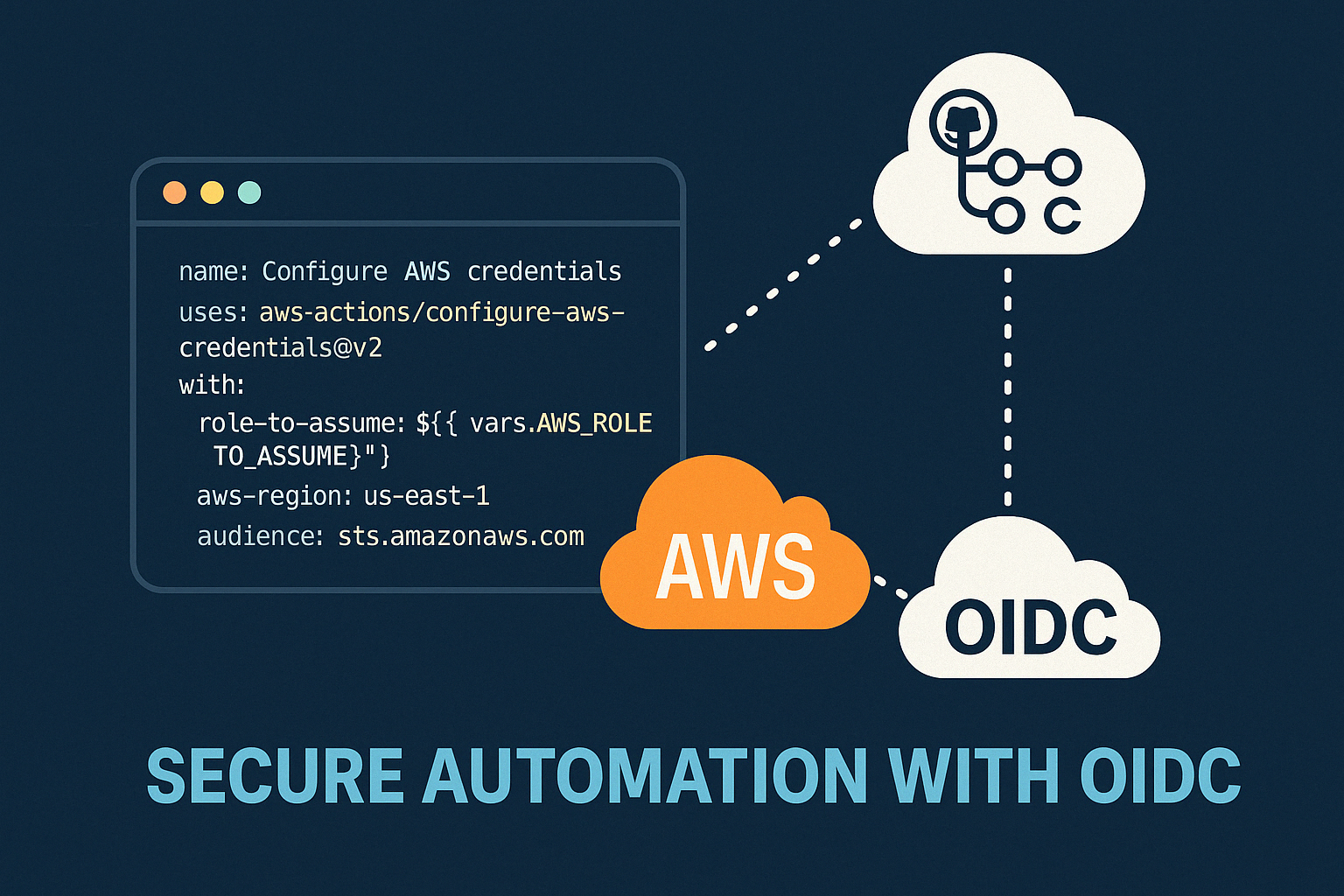

Modern DevOps နှင့် Cloud Security တို့မှာ အဓိကဖြစ်လာသည့် Authentication System
ယနေ့ခေတ် DevOps, Cloud Engineering, CI/CD Pipeline တွေမှာ “OIDC” ဆိုတဲ့စကားလုံးကို မကြာခဏဆိုသလိုကြားလာရပါတယ်။ အထူးသဖြင့် GitHub Actions, AWS, Kubernetes, Google Login, Single Sign-On (SSO) စတဲ့ system တွေမှာ OIDC ကို နေရာတိုင်းလိုလို အသုံးပြုလာကြပါတယ်။
ဒီ article မှာတော့ Beginner DevOps Engineer တစ်ယောက်နားလည်လွယ်အောင် -
- OIDC ဆိုတာဘာလဲ
- OAuth2 နဲ့ OIDC ဘာကွာလဲ
- JWT Token ဆိုတာဘာလဲ
- GitHub Actions နဲ့ AWS မှာဘယ်လိုအသုံးပြုလဲ
- IAM Role & Trust Policy ဆိုတာဘာလဲ
ဆိုတာတွေကို practical DevOps perspective နဲ့ရှင်းပြသွားမှာဖြစ်ပါတယ်။
OIDC ဆိုတာဘာလဲ?
OIDC = OpenID Connect
OIDC ဟာ modern authentication protocol တစ်ခုဖြစ်ပြီး user identity ကို verify လုပ်ပေးဖို့ အသုံးပြုပါတယ်။
လူသုံးများတဲ့ example တွေက -
- Continue with Google
- Login with GitHub
- Login with Microsoft
စတဲ့ Social Login System တွေပါ။
ဥပမာ - Website တစ်ခုမှာ Google Account နဲ့ Login ဝင်တဲ့အခါ -
1Google က:
2
3"ဒီ user ဟာ Google မှာ authenticate
4ဖြစ်ပြီးသား valid user ဖြစ်ပါတယ်"
ဆိုပြီး Website ကို identity information ပို့ပေးတာဟာ OIDC ဖြစ်ပါတယ်။
OAuth2 နဲ့ OIDC ဘာကွာလဲ?
ဒီနှစ်ခုကို Beginner တွေ အများဆုံး confuse ဖြစ်ကြပါတယ်။
OAuth2
OAuth2 ဟာ Authorization Framework ဖြစ်ပါတယ်။
သူ့ရဲ့အဓိကတာဝန်က -
1"ဒီ application ကို
2ဘာ access တွေပေးမလဲ?"
ဆိုတာကို control လုပ်ပေးတာဖြစ်ပါတယ်။
ဥပမာ -
1Allow this app to access your Google Drive?ဒါဟာ OAuth2 ဖြစ်ပါတယ်။
OIDC
OIDC ကတော့ Authentication Layer ဖြစ်ပါတယ်။
သူမေးတာက -
1"ဒီ user က ဘယ်သူလဲ?"ဥပမာ -
1This user is bhone@example.comဆိုပြီး identity verify လုပ်ပေးတာပါ။
Real-world flow မှာတော့ Authentication အရင်လာပြီး Authorization လာပါတယ်။
OIDC ဟာ OAuth2 protocol အပေါ်မှာ identity layer ထပ်ပေါင်းထားတဲ့ authentication standard တစ်ခုဖြစ်ပါတယ်။
| Technology | Purpose |
|---|---|
| OAuth2 | Authorization |
| OIDC | Authentication |
JWT Token ဆိုတာဘာလဲ?
OIDC မှာ အဓိကအသုံးပြုတာ JWT Token ဖြစ်ပါတယ်။
JWT = JSON Web Token
JWT ဟာ identity information ပါတဲ့ token format တစ်ခုဖြစ်ပါတယ်။
ပုံစံက -
1xxxxx.yyyyy.zzzzzJWT မှာ 3 ပိုင်းပါပါတယ် -
1HEADER.PAYLOAD.SIGNATUREJWT Structure
1. Header
ဘယ် algorithm သုံးထားလဲဆိုတာပါဝင်ပါတယ်။
ဥပမာ -
1{
2  "alg": "RS256",
3  "typ": "JWT"
4}
2. Payload (Claims)
User information တွေပါဝင်ပါတယ်။
1{
2  "sub": "user123",
3  "email": "bhone@example.com",
4  "iss": "https://accounts.google.com",
5  "aud": "my-web-app",
6  "exp": 1712345678
7}
Common Claims တွေက -
| Claim | Meaning |
|---|---|
| sub | User ID |
| iss | Token issuer |
| aud | Intended audience |
| exp | Expire time |
| iat | Issued time |
3. Signature
Token ကို modify မလုပ်ထားကြောင်း verify လုပ်ဖို့အသုံးပြုပါတယ်။
DevOps မှာ OIDC ဘာကြောင့်အရေးကြီးလာတာလဲ?
ဒီတခါမှာတော့ GitHub Actions OIDC ကို ဥပမာပေးပြီးပြောပြသွားပါမယ်ဗျ။
ယခင် CI/CD Pipeline တွေမှာ AWS Access Key တွေကို GitHub Secrets ထဲမှာ သိမ်းထားကြပါတယ်။
ဥပမာ -
1AWS_ACCESS_KEY_ID
2AWS_SECRET_ACCESS_KEY
ဒါပေမယ့် ပြဿနာတွေရှိနိုင်တယ် -
- Secret leak ဖြစ်နိုင်တယ်
- Long-lived credential ဖြစ်တယ်
- Rotate လုပ်ရခက်တယ်
- Security Risk များတယ်
Modern Solution = OIDC
ယနေ့ခေတ်မှာ GitHub Actions က AWS ကို temporary identity token ပို့ပြီး authenticate လုပ်ပါတယ်။
Flow က -
1GitHub Actions
2      ↓
3OIDC JWT Token Generate
4      ↓
5AWS STS Verify OIDC Token
6      ↓
7Temporary Credentials Generate
8      ↓
9Deploy to AWS
ဒီလိုလုပ်တဲ့အတွက် permanent AWS secret သိမ်းစရာမလိုတော့ပါဘူး။
GitHub Actions + AWS OIDC Example
GitHub Workflow မှာ -
1permissions:
2  id-token: write
3  contents: read
ဆိုတာထည့်ရပါတယ်။
ပြီးရင် -
1uses: aws-actions/configure-aws-credentialsဆိုတဲ့ official GitHub Action ကိုအသုံးပြုပြီး AWS login ဝင်နိုင်ပါတယ်။
အသေးစိတ်ကိုတော့ official documentation မှာသွားဖတ်လို့ရပါတယ်ဗျ။
IAM Role ဆိုတာဘာလဲ?
ဖတ်တဲ့သူတွေထဲမှာ AWS ကိုမရင်းနှီးတဲ့သူတွေလည်းပါလောက်မယ်လို့ယူဆပြီး ဒီနေရာမှာ AWS IAM Role အကြောင်းကိုလည်း အနည်းအကျဉ်းရှင်းပြပေးပါ့မယ်ဗျ။
AWS IAM Role ဟာ temporary permission identity တစ်ခုဖြစ်ပါတယ်။
ဥပမာ -
1ဒီ pipeline က ECR ကို push လုပ်ခွင့်ရှိတယ်ဆိုတာမျိုး permission ပေးတာပါ။
IAM Role ကဘာကြောင့်ကောင်းတာလဲ?
Static Access Key မသုံးတော့ဘဲ -
- Temporary Credential
- Auto Expire
- Safer
- Easier Auditing
ဖြစ်လာပါတယ်။
IAM Trust Policy ဆိုတာဘာလဲ?
Trust Policy ဆိုတာ AWS က -
1"ဘယ် external system ကို ယုံကြည်မလဲ?"ဆိုတာသတ်မှတ်ပေးတဲ့ policy ဖြစ်ပါတယ်။
ဥပမာ -
AWS က GitHub OIDC Provider ကို trust လုပ်ထားမယ်။
Example Trust Policy
1{
2  "Effect": "Allow",
3  "Principal": {
4    "Federated": "arn:aws:iam::123456789:oidc-provider/token.actions.githubusercontent.com"
5  },
6  "Action": "sts:AssumeRoleWithWebIdentity",
7  "Condition": {
8    "StringEquals": {
9      "token.actions.githubusercontent.com:sub":
10      "repo:username/project:ref:refs/heads/main"
11    }
12  }
13}
Production Level Security
ပို secure ဖြစ်အောင် -
- Specific Repository
- Specific Branch
ကိုပဲ allow လုပ်ကြပါတယ်။
ဥပမာ -
1repo:username/project:ref:refs/heads/mainMain branch က workflow ပဲ deploy လုပ်နိုင်မယ်ဆိုတဲ့သဘောပါ။
OIDC ရဲ့အားသာချက်များ
1. Secret မလိုတော့ခြင်း
AWS Access Key သိမ်းစရာမလိုတော့ပါဘူး။
2. Temporary Credentials
Credential တွေ auto expire ဖြစ်ပါတယ်။
3. Better Security
Long-lived secrets မရှိတော့တဲ့အတွက် safer ဖြစ်ပါတယ်။
4. Cloud Native Standard
AWS, Azure, GCP, Kubernetes အားလုံးမှာအသုံးပြုနေကြပါတယ်။
Real World Use Cases
OIDC ကို -
1GitHub Actions → AWS
2GitLab → Cloud
3Kubernetes Login
4Google Login
5Company SSO
6ArgoCD Login
7Grafana Login
စတဲ့နေရာတွေမှာ အသုံးပြုပါတယ်။
အနှစ်ချုပ်ရမယ်ဆိုရင်တော့
OIDC ဟာ Modern DevOps နဲ့ Cloud Security မှာ မရှိမဖြစ် authentication standard တစ်ခုဖြစ်လာပါတယ်။
ယခင် Static Secret Based Authentication ကနေ -
1Temporary Trust-Based Authenticationကိုပြောင်းလာတဲ့အတွက် -
- More Secure
- Easier Management
- Cloud Native
- Zero Trust Friendly
ဖြစ်လာပါတယ်။
အထူးသဖြင့် GitHub Actions + AWS CI/CD Pipeline တွေမှာ OIDC knowledge ဟာ DevOps Engineer တစ်ယောက်အတွက် အရမ်းအရေးကြီးတဲ့ skill တစ်ခုဖြစ်ပါတယ်။
ကျနော်က အခုမှ DevOps ကိုလေ့လာသင်ယူနေဆဲ ဖြစ်တဲ့ သူတယောက်ဖြစ်တာကြောင့် စာအရေးအသား concept ယူဆပုံ၊ နားလည်ထားတာ တခုခုလွဲမှားနေခဲ့ရင် လွတ်လပ်စွာ ဝေဖန်ထောက်ပြ သင်ကြားပေးနိုင်ပါတယ်ခင်ဗျ။ အစအဆုံးဖတ်ရှုပေးလိုလည်း ကျေးဇူးတင်ပါတယ်ခင်ဗျ။
Discussion
Join the conversation
How do you feel about this article?
Comments
Sign in to join the conversation
Sign in to be the first to comment!
Share Your Article
Share with your professional network
Recent Articles
Day 1 - Software Development ကို ပိုပြီးမြန်စေမယ့် CI/CD
Software တစ်ခုရေးပြီးပြီဆိုရင် "ငါ့စက်ထဲမှာတော့ အလုပ်လုပ်တယ်" ဆိုရုံနဲ့ မပြီးသေးပါဘူး။ User တွေသုံးမယ့် Server ပေါ်ရောက်...
Manual vs Automated Infrastructure: Why "useradd" Still Matters in the Terraform Era
DevOps careerကို လျှောက်နေတဲ့သူတိုင်း Terraform၊ Ansible စတဲ့ Infrastructure as Code (IaC) tools တွေရဲ့ အလုပ်လုပ်နိုင်စွ...


From Surviving to Thriving
“AI ကြောင့် developer အလုပ်ပျောက်သွားမလား?” ဆိုတဲ့ မေးခွန်းကို Junior developer တိုင်း စဉ်းစားဖူးကြမှာပါ။ ဈေးကွက်အခြေအနေ...


AWS - Global Infra
AWS Global Infra AWS Global Infra & Service Type ဆိုတဲ့ ခေါင်းစဉ်နဲ့ ၂၀၂၅ ဒီဇင်ဘာမှာရေးထားဖူးတဲ့ article ကို အရင်ဆုံး ဖတ...

Production Grade AKS Secret Management Using Azure Key Vault and Managed Identity
ကျွန်တော်တို့ Application တွေမှာ အသုံးပြုတဲ့ .env (Sensitive Data) တွေကို secure ဖြစ်အောင် manage လုပ်ဖို့ဆိုတာ DevOps တ...